What Kassly prints for BIR, today
Last updated · Checked against the app itself, not our plans
Accreditation status, as of 29 September 2026
Kassly is not BIR-accredited. Symflo's application to have Kassly accredited by the BIR is in progress. Until it is issued, what Kassly prints is a transaction record, not an official receipt or invoice, so keep issuing your BIR-registered receipts. We'll update this date when the status changes.
Here is every BIR-related record Kassly produces now: what's on it, where to find it, and what it costs. Each one comes with a sample made by the app's own export from a test store.
New to the terms? Read what "BIR-ready" really means first. For every detail, see BIR compliance in the user manual.
BIR guides for small stores
The rules themselves, dated and sourced to the BIR issuances. Start with BIR EIS: who must e-invoice, and when.
- E-invoicing vs electronic sales reporting: two different BIR duties
- EIS vs CAS vs POS accreditation vs PTU: which one does your store need?
- The EOPT Act and your invoices: what replaced the official receipt
- How to register a POS with the BIR
- Senior citizen and PWD discounts: the rules, with worked examples
- VAT vs non-VAT: the ₱3 million line and what changes on your invoices
- Books of accounts: manual, loose-leaf or computerized?
- X reading and Z reading, explained
X and Z readings
- Plan:
- Cash Drawer & Expenses, ₱300/branch/month
- Where:
- Sales → Shifts, and Reports → Z-Reading
- Formats:
- PDF sized for an 80mm printer; Z readings over a date range as CSV
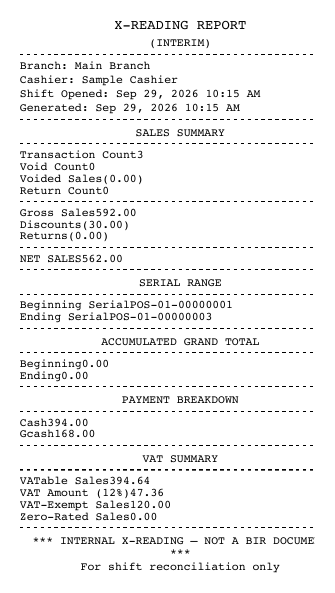
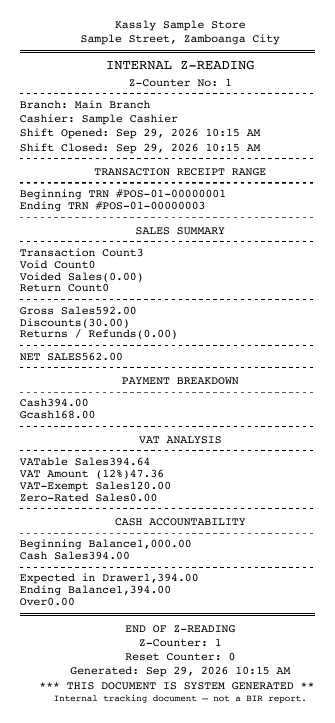
An X reading is a mid-shift summary you can print at any time. Closing a shift seals a Z reading that can't be edited, and each terminal's business day is sealed too.
- Transaction, void and return counts; gross sales, discounts, returns and net sales
- First and last receipt number of the shift
- Payment breakdown: cash, GCash, Maya, card and the rest
- VAT analysis: VATable sales, VAT, VAT-exempt and zero-rated sales
- Cash count: opening float, expected cash, counted cash, over or short
- Z counter and reset counter
Until a store is accredited, the Z reading is titled "INTERNAL Z-READING" and marked as an internal document, not a BIR report.
Receipts for VAT and non-VAT stores
- Plan:
- Every plan, free included
- Where:
- Printed from the POS; set your tax type in Settings → Store Settings
- Formats:
- Thermal print (58mm or 80mm) and PDF
You tell Kassly whether your store is VAT-registered, pays percentage tax, or is exempt. For VAT stores it works out VAT per item and splits every sale into VATable, VAT-exempt and zero-rated amounts. Receipt numbers run in an unbroken series per terminal, and gaps can be found afterwards.
- Store name, branch address, receipt number, date, cashier and customer
- Items, discounts, total, payments, tendered and change
- Non-VAT stores that are tax-exempt get an "EXEMPT" label
- The VAT split goes into your readings, reports and books on every sale
Until a store is accredited, the receipt is headed "TRANSACTION RECORD" and ends with "This is not a BIR invoice." It leaves off the TIN, MIN, PTU and the VAT lines, even if you have filled them in. Keep issuing your BIR-registered receipts or invoices to customers.
Senior citizen and PWD discounts
- Plan:
- Every plan, free included. The SC/PWD sales book is part of Business Reports, ₱400/branch/month
- Where:
- At the counter, on the sale
- Formats:
- Receipt as above; SC/PWD sales book as CSV
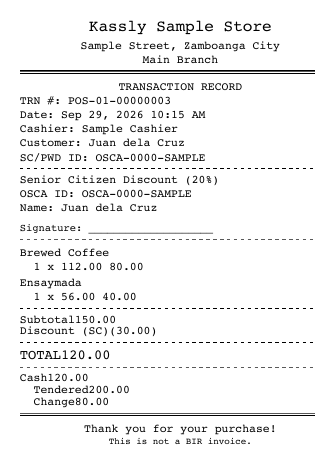
Kassly applies the statutory discount for you: 20% for senior citizens, PWDs and national athletes and coaches (NAAC), and 10% for solo parents. For VAT-inclusive prices it removes the VAT first, then takes the discount, and marks the line VAT-exempt.
- The cashier must enter the ID number and the cardholder's name, or pick a saved customer who has them
- The discount can go on selected items only
- It can't be combined with a manual discount on the same sale
- The receipt shows the discount type, rate, ID number, name and a signature line
- An SC/PWD sales book per ID type: date, receipt number, name, ID, TIN, gross, discount, net and the VAT split
The SC/PWD sales book is built and exports to CSV, but no screen in the app shows it yet.
More on senior citizen and pwd discounts → · Work out an SC/PWD discount with the free calculator →
Summary lists of sales and purchases
- Plan:
- Business Reports, ₱400/branch/month
- Where:
- Sales → BIR Reports
- Formats:
- On screen and CSV
The Summary List of Sales and Summary List of Purchases, by quarter, ready for your bookkeeper.
- Sales: receipt number, date, customer, TIN, VATable, VAT-exempt, zero-rated, VAT and total
- Purchases, from received purchase orders: PO number, date received, supplier, TIN and total
Books of accounts
- Plan:
- Every plan, free included
- Where:
- Sales → Books of Accounts (see note)
- Formats:
- On screen, CSV and A4 PDF
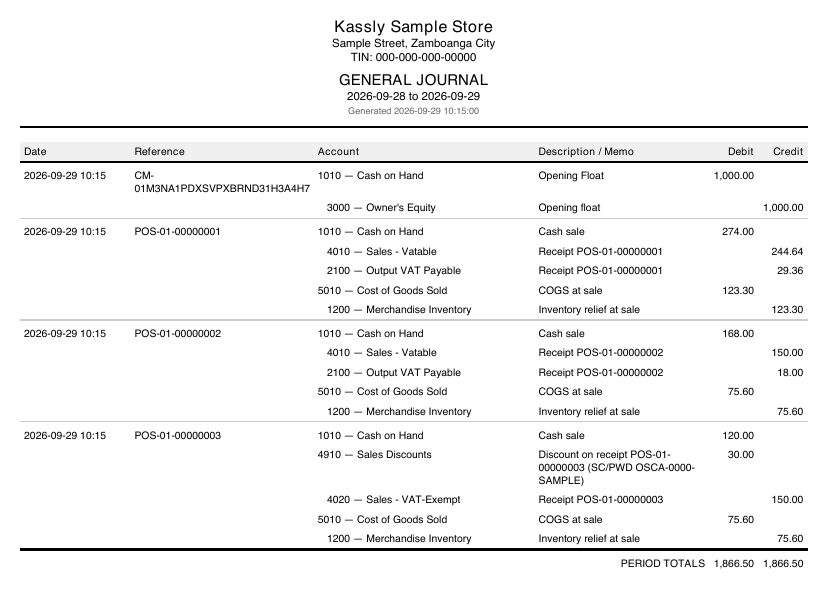
Kassly builds the books from what you already record: sales, returns, expenses, purchase orders, payroll and shift closes. You never type a journal entry.
- General Journal, General Ledger, Trial Balance and Cash Disbursements Journal
- Balance Sheet and Income Statement
- Your store name, address and TIN on the letterhead
Books of Accounts appears in the menu once a store is accredited. Until then the books are still built, and support can give you the direct link. There is no separate Cash Receipts, Sales or Purchases Journal.
What Kassly doesn't do
- Issue official receipts or invoices. Kassly's printout is a transaction record. Keep issuing your BIR-registered receipts or invoices.
- Give you an e-journal to download. There is no e-journal export in the app.
- Send anything to the BIR. Nothing is filed or transmitted, including e-invoices. You or your accountant still file every return.
- Register your books or apply for your Permit to Use. Those happen between you and your RDO.
Frequently asked questions
Is Kassly BIR-accredited?
No. As of 29 September 2026, Symflo's application to have Kassly accredited by the BIR is in progress. Until it is issued, Kassly's printouts are transaction records, not official receipts or invoices, and you keep issuing your BIR-registered receipts.
Does Kassly print X and Z readings?
Yes. X readings mid-shift and a sealed Z reading when a shift closes, with receipt number range, payment breakdown, VAT analysis, cash count and Z and reset counters. They come with the Cash Drawer & Expenses, ₱300/branch/month add-on. Until a store is accredited they are marked as internal documents.
How does Kassly handle senior citizen and PWD discounts?
On every plan, Kassly removes the VAT from a VAT-inclusive price, takes 20% off (10% for solo parents), marks the item VAT-exempt, and requires the ID number and name, which print on the receipt with a signature line.
Does Kassly produce books of accounts?
Yes, on every plan: General Journal, General Ledger, Trial Balance and Cash Disbursements Journal, plus a Balance Sheet and Income Statement, as CSV or A4 PDF. Kassly does not register your books with the BIR.
Can I download an e-journal from Kassly?
No. There is no e-journal export in the app today.
Related: BIR guides · What "BIR-ready" really means · BIR compliance (manual) · Books of accounts · Compare Kassly